

Martin Wheatley
Founder, The AI Leader Lab · CIMA Qualified · Managing Director, Rawson Ellis
Most weeks, I'd start Monday with good intentions and finish Friday wondering where the plan went. Sound familiar?
Not because I wasn't working, I was working plenty. Just not always on the right things.
Running your own business means incoming priorities never stops. Client work, emails, new tools to evaluate, podcasts to prep and record, proposals to prep. And working in AI specifically adds a layer of noise that's hard to describe to people outside it: there is something genuinely interesting or alarming or worth reading every single day. You could quite literally spend all day reading and testing.
That's both the privilege and the massive problem for an early adopter like me who likes tech.
I'd set aside time in my diary for what I called CEO time and Manager time. CEO time to review the week and set priorities. Manager time to fit those priorities into the calendar for the week ahead. On paper it was a solid system and it worked amazingly well, for about three weeks.
Then I drifted.
Gradually at first but then suddenly. Reactive work filled the slots I'd reserved for proactive work, and the planning sessions got shorter, then optional, then dropped out completely.
So, rather than keep getting annoyed, I built something to keep me honest.
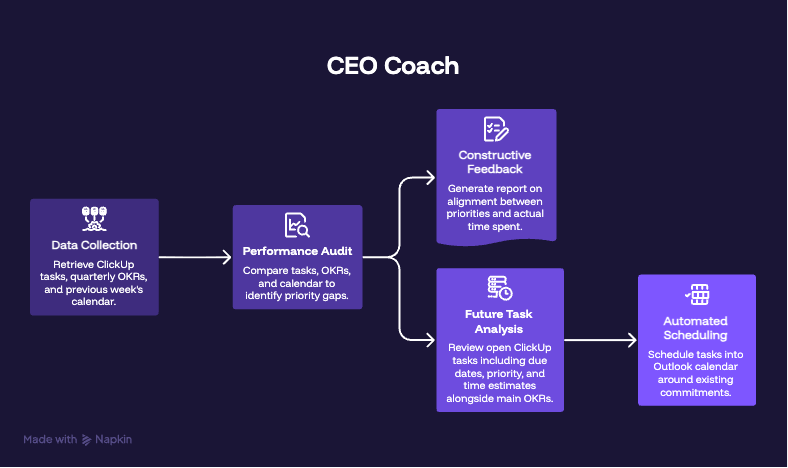
I work in Microsoft Outlook, Claude, and ClickUp day to day, with Microsoft Copilot CoWork increasingly as part of that stack (until they start charging per token perhaps!). What I put together was a CEO Coach: an automated, weekly agent that pulls three things together and produces a proper account of how I'm spending my time against what I said I wanted to achieve.
Here's what it does.
- It reads my open and completed tasks from ClickUp.
- It looks at my OKRs for the quarter, the goals I've set for myself.
- It pulls my calendar for the previous week, which I use as more than a schedule: every item on my calendar is meant to represent time I've intentionally set aside for a specific task. So the calendar is, in theory, a record of what I actually prioritised.
- The agent then compares those three things against each other and produces what I can only describe as a "constructive feedback" document. Where my calendar time matched my priorities. Where it didn't. What got pushed or ignored. What the gap is between where I said I'd focus and where I actually put my hours.
Sometimes I read it and agree with every word. Sometimes I push back in my head. Either way, it's useful.
That's the review side. The other half is forward-looking.
After the audit, the agent:
- looks at my open ClickUp tasks: their due dates, the priority flag I've set, and the time estimate I've attached to each one.
- It then schedules them into the available Outlook calendar slots for the coming week, working around existing meetings, podcast recordings, and client calls.
I could build that calendar myself, and in fact, I used to. But doing it manually meant going through each task, checking the diary, making a judgement about where it fits, and repeating that across every item.
The thinking isn't complicated, it's just a friction on a Friday afternoon that was not needed. And enough friction means you do it badly or you don't do it.
Having it done automatically has made a real difference. I'm not exaggerating when I say it saves me 2-3 hours a week. But the bigger thing, and this is harder to quantify, is that it takes away the mental overhead of organising myself. That bandwidth, however small it sounds, was going somewhere unproductive before.
The time saving is the smallest benefit from this workflow. It's the alignment and clarity it now gives me at the start of each week to keep me orientated in the right direction.
ClickUp has its own planner feature that can do something similar. The reason I built this differently was that I wanted something that considered the wider context: not just task parameters, but how the week looked compared to my goals and what had been completed the week before. Passing it through that lens, through the comparison and the context, is what makes it feel like a proper feedback loop rather than a scheduling tool.
Two iterations to get it to work as I wanted and a few small tweaks after that. Now it runs automatically, every week, without me having to think about it.
And I want to be clear about what it doesn't do. It doesn't make decisions for me. I can ignore the calendar it produces, I can override every recommendation in the review. And I do, occasionally. But having the checkpoint there means I'm more conscious of what I'm doing and why, which is genuinely useful when you've got a hundred things competing for your attention at any given point.
I look back at some of my roles before this, running large operational teams with multiple leadership layers, and think how different some weeks might have been with this kind of feedback loop running. Not just for me, but for the teams I was part of. There's something interesting about what would happen scaling this up: not one person reviewing their own week, but a team reviewing collectively how they're tracking against shared objectives automatically.
That feels like a genuinely different way of working, that doesn't rely on time consuming meetings for the sake of meetings, and probably worth its own article at some point.
I've been running this for a few weeks now.
I'm still positive about it, which I think is a reasonable early signal. But I'm also realistic: the real test is whether I'm still using it in six months, or whether it becomes one of those systems that works brilliantly until it quietly becomes part of the background.
I'll let you know.
If you're experimenting with agents or agentic workflows for personal productivity, I'd be genuinely curious what you've built or tried. Always more interesting than the tools themselves.